This guide contains affiliate links. As an Amazon Associate we earn from qualifying purchases, at no extra cost to you. Learn more.
In this guide
The best smart home features for new construction are the ones you cannot easily add later: the wires, conduit and circuits inside your walls. Devices like thermostats and locks can be swapped anytime, but running Ethernet, camera cable or a 240V circuit after drywall means holes, patches and paint. Plan the infrastructure while the walls are open, then add devices on your own schedule.
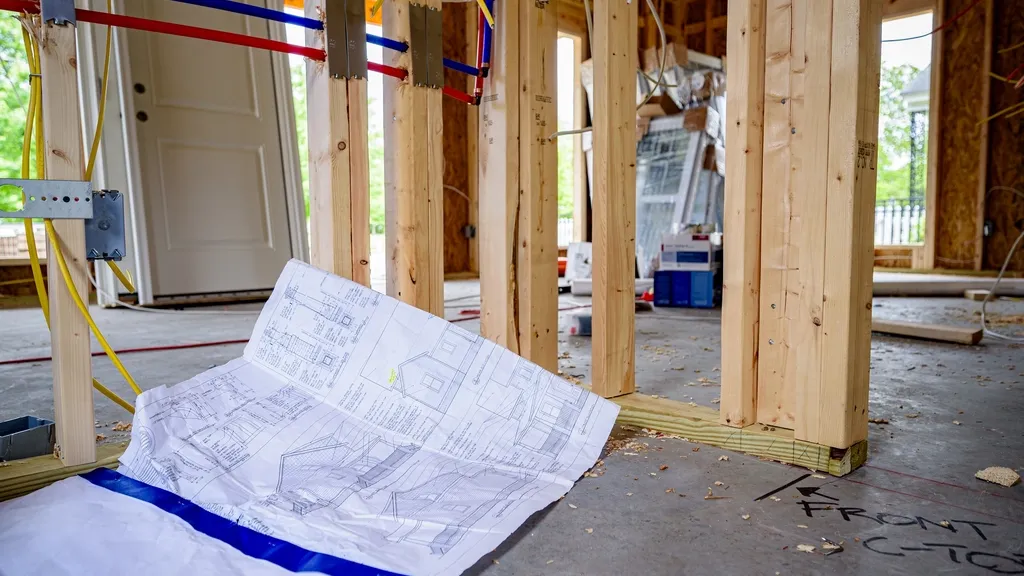
Bring this list to your electrician and low-voltage contractor before rough-in. The pre-drywall walk on our new construction inspection checklist is your chance to confirm everything was actually installed.
Part 1: What to pre-wire while the walls are open
Cat6 Ethernet to key rooms
Wi-Fi is great, but a wired connection is faster and more reliable for things that matter. Consider Ethernet runs to:
- The home office and any room that might become one
- Each TV location and media wall
- Ceiling locations for Wi-Fi access points, typically one per floor or wing
- A central network location, often a closet or utility space with power
Run all cables back to one location so your modem, router and network switch live together. Label both ends. Cat6 is a common, future-friendly choice for most homes.
Conduit for the future
Technology changes faster than houses. Empty conduit (sometimes called smurf tube) from the network closet to the attic, behind the TV wall and to the garage gives you a way to pull new cables later without opening walls. It is one of the cheapest forms of future-proofing you can buy.
PoE camera drops
Power over Ethernet (PoE) cameras get power and data through a single cable, which is usually more reliable than battery or Wi-Fi cameras. Mark camera locations on your plans, typically at the eaves covering each entry, the driveway and the backyard, and have a cable run to each spot. Add one at the front door for a wired video doorbell, plus the low-voltage wire it needs.
Low-voltage wiring
Consider low-voltage runs for a wired doorbell, hardwired security sensors, in-ceiling speakers and any motorized shades. Even if you plan to use wireless devices, a wired option often performs better and needs no battery changes.
Neutral wires at switch boxes
Many smart switches and dimmers require a neutral wire in the box. Ask your electrician to confirm a neutral is present at every switch location, including three-way and four-way switch boxes. Consider deeper boxes where you expect smart switches, since they tend to be bulkier than standard switches.
EV-ready 240V circuit
Even if you do not drive an electric vehicle today, there is a good chance you or a future buyer will. Have your electrician install a dedicated 240V circuit to the garage, ending in an outlet or junction box near where you would park. Make sure your panel has capacity for it. The circuit size depends on the charger you might use, so discuss it with your electrician.
Whole-home surge protection
A smart home is full of electronics, and Texas storms bring lightning and power fluctuations. A whole-home surge protective device installed at the electrical panel helps protect against surges entering through the service. Ask your electrician whether one is required or recommended under your local code, then layer point-of-use surge protectors at sensitive equipment.
Pro tip: Before drywall, take photos and a slow video of every wall with low-voltage cable, and keep a simple map of where each run ends. When you want to mount a TV or add a camera years from now, you will know exactly where the cable is.
Part 2: Smart devices worth adding
Once the house is wired, you can choose devices at move-in or later. Pick one ecosystem, like Google Home, Amazon Alexa or Apple Home, and check compatibility before buying. Newer devices that support the Matter standard tend to work across ecosystems, but confirm on the product listing.
Smart thermostat
In Texas, cooling is a big part of your utility bill. A smart thermostat can learn your schedule, adjust when you are away and let you check the house from your phone. A Nest thermostat is a popular choice for Google households, and there are other well-reviewed smart thermostats that work with Alexa and Apple Home. Confirm compatibility with your HVAC system, especially with multi-stage equipment or heat pumps; many require a C-wire, so ask your HVAC sub to run one.
Smart lock and video doorbell
A smart lock lets you give temporary codes to trades during the punch-list phase, cleaners or family, without handing out keys. A video doorbell shows you who is at the door and logs deliveries. If you pre-wired for a doorbell, choose a wired model for reliable power.
Water leak sensors
A slow leak under a sink, behind the refrigerator or at the water heater can do serious damage before you notice it. Small, inexpensive leak sensors placed at these spots can send an alert to your phone. Some systems can also trigger an automatic water shutoff valve if one is installed.
Smart smoke and CO alarms
Your builder will install code-required smoke alarms, and CO alarms where required. Smart smoke and CO alarms add phone alerts, so you know about a problem even when you are away. Confirm any replacement meets local requirements, including interconnection.
EV charger
If you installed an EV-ready circuit, adding a Level 2 home EV charger later is straightforward. Have a licensed electrician install it and confirm it matches the circuit's rating. Many readers coming from apartments with shared chargers, like those in our EV-friendly apartments guide, find home charging one of the best perks of a new house.
Surge protectors at your equipment
Whole-home surge protection works best paired with quality point-of-use surge protectors at the TV, computer, network gear and other sensitive electronics.
Who installs what
On a new build, smart-home work is split between trades, and gaps happen when nobody owns a task. Sort it out before rough-in:
- Licensed electrician: line-voltage work, including switch boxes and neutrals, the 240V EV circuit, the whole-home surge protector and any hardwired smoke and CO alarms.
- Low-voltage or security contractor: Ethernet, camera cable, conduit, doorbell wire and speaker wire. Some electricians do this too; confirm it is in someone's written scope.
- HVAC contractor: thermostat wiring, including a C-wire for smart thermostats.
- You, after move-in: most plug-in and battery devices, like leak sensors, and app setup.
Write the pre-wire list into each sub's bid so it is priced and not an afterthought. Our guide to hiring and managing subcontractors covers how to keep scopes clear.
Budget and priorities
If your budget is tight, prioritize in this order: things inside the walls first, devices later. Wiring and conduit are relatively inexpensive during construction and expensive afterward. Devices can be added one at a time as budget allows. Keep smart-home items in their own line of your build budget so they do not quietly creep.
| Do during construction | Can wait until after move-in |
|---|---|
| Cat6 runs and network closet | Router, mesh access points |
| Conduit to attic and TV walls | TVs, streaming devices |
| PoE camera drops | Cameras and recorder |
| Neutral wires and deep switch boxes | Smart switches and dimmers |
| 240V EV circuit | EV charger |
| Whole-home surge protector | Point-of-use surge strips |
Smart features also pair well with efficiency upgrades. A smart thermostat delivers more when the house is tight and well insulated, as covered in our post on energy-efficient building in the Texas heat.
Next steps
Add your pre-wire list to your plans before the electrician bids, and check it off at the pre-drywall walk. For more on what to buy once you get the keys, see first things to buy for a new home, and for help planning the whole build, try our free training.
Frequently asked questions
What smart home wiring should I do before drywall?
The most common pre-wire items are Cat6 Ethernet to key rooms, PoE camera drops, empty conduit to the attic and media walls, low-voltage runs for doorbells and sensors, neutral wires at switch boxes, and a 240V circuit in the garage for future EV charging.
Do smart switches need a neutral wire?
Many smart switches do. Ask your electrician to run a neutral to every switch box; it is often already standard practice under current code, but confirming it before drywall avoids headaches when you install smart switches later.
Is Wi-Fi enough, or do I need Ethernet in a new home?
Wi-Fi works for most devices, but wired Ethernet to a few key locations, like the office, TV wall and ceiling access points, gives faster and more reliable service. Running cable during construction costs far less than fishing it later.
Should I install an EV charger during construction?
At minimum, have a 240V circuit and outlet or junction box installed in the garage during construction, sized per your electrician's recommendation. You can add the charger itself whenever you buy an electric vehicle.